
Sunrisetechs-Phoneicon-Sidebar
Top Microsoft Copilot Development Companies in Australia

Top Microsoft Copilot Development Companies in Australia

Table of Contents

Microsoft Copilot is being talked about in every boardroom right now. Demos look promising. Vendors highlight productivity gains. Internal teams are experimenting with it across Word, Teams, and Dynamics.

But once organisations move beyond trials, a more grounded question starts to surface:

How do we make Microsoft Copilot actually useful inside our business?

Not in isolated use.
Not as a novelty feature.
But embedded into the way teams work—across sales, operations, finance, and customer service.

This is where most initiatives stall.

Out-of-the-box Copilot is powerful, but it’s not designed around your internal processes, your data structure, or the complexity of your systems. Without that alignment, it often becomes another layer of interaction rather than a driver of efficiency.

In our experience, this is the turning point. Organisations that treat Copilot as a tool see limited returns.Those that treat it as a custom-built business layer start seeing real impact.

That’s why demand is shifting toward Microsoft Copilot development companies in Australiateams that can actually build, customise, and integrate Copilot into real business environments.

This guide is built for enterprise buyers, CTOs, and experienced decision-makers who are not looking for theory—but for partners who can deliver working systems.

What is Microsoft Copilot Development?

Microsoft Copilot development refers to the process of designing, building, and integrating custom Copilot solutions tailored to business workflows.

Instead of relying only on standard features, development involves:

  • Creating custom Copilot agents using Copilot Studio
  • Integrating Copilot with Microsoft 365, Dynamics 365, and internal systems
  • Automating workflows across departments
  • Extending functionality through APIs and secure data access

For most organisations, this is the difference between:

  • A tool that assists occasionally
  • vs

  • A system that actively reduces workload every day

This is why businesses are now searching for Microsoft Copilot development services in Australia rather than just advisory support.

What Does a Microsoft Copilot Developer Do?

A Microsoft Copilot developer is responsible for turning Copilot into something practical.

Their work typically includes:

  • Building custom Copilot agents aligned with business use cases
  • Designing workflows that reduce manual effort
  • Integrating Copilot with CRM, ERP, and internal tools
  • Creating secure access layers for sensitive data
  • Optimising performance based on real usage

This role sits at the intersection of:

  • Business understanding
  • Microsoft ecosystem expertise
  • System integration

In simple terms, they don’t just configure Copilot—they make it usable at scale.

Turn Microsoft Copilot Into a System Your Teams Actually Use

Most Copilot setups stay surface-level. We design and build custom Copilot solutions that connect with your CRM, ERP, and workflows—so your teams save time, not just experiment.

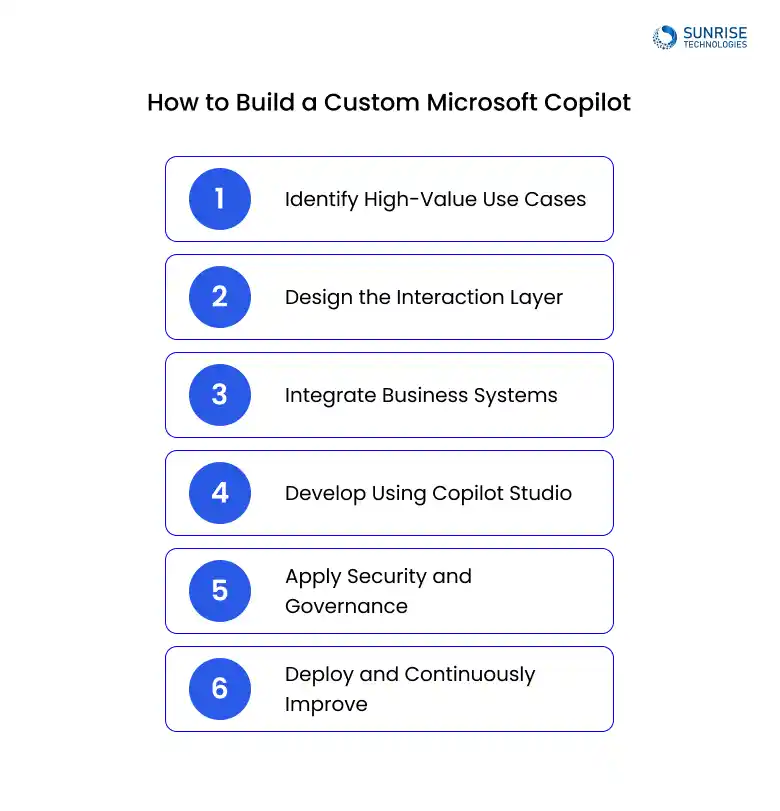
How to Build a Custom Microsoft Copilot

Most successful implementations follow a structured approach:
how-to-build-a-custom-microsoft-copilot

1. Identify High-Value Use Cases

Start with areas where teams lose time—manual reporting, repetitive queries, or fragmented systems.

2. Design the Interaction Layer

Decide how users will interact with Copilot:

  • Inside Teams
  • Within CRM Systems
  • Through Internal Portals

3. Integrate Business Systems

This is where most value is unlocked:

  • Dynamics 365
  • Microsoft 365 Data
  • Third-Party Platforms
  • Internal Databases

4. Develop Using Copilot Studio

Build agents that:

  • Understand Business Context
  • Trigger Workflows
  • Deliver Actionable Outputs

5. Apply Security and Governance

Ensure compliance with:

  • Australian Data Requirements
  • Role-Based Permissions
  • Internal Governance Policies

6. Deploy and Continuously Improve

Refine based on usage, expand across teams, and optimise workflows.

This is the foundation behind enterprise Microsoft Copilot development.

Top Microsoft Copilot Development Companies in Australia

1. Sunrise Technologies Australia

Sunrise-Tech-logo

Sunrise technologies stands out for its focus on end-to-end Microsoft Copilot development, covering everything from architecture to deployment.

Why They Stand Out

Unlike many providers that focus on advisory, Sunrise works directly on:

  • Custom Copilot agent development
  • Integration with Dynamics 365, Microsoft 365, and enterprise systems
  • Workflow automation tailored to business operations
  • Secure deployment aligned with Australian enterprise requirements

Key Strengths

  • Strong expertise in Microsoft ecosystem integrations
  • Experience with mid-sized and enterprise business workflows
  • Ability to translate business requirements into practical Copilot solutions
  • Focus on measurable business outcomes, not just technical implementation

Best Fit For

  • Organisations looking to build internal Copilot systems
  • Businesses requiring deep CRM and ERP integration
  • Teams aiming to reduce manual processes at scale

2. Data#3

data3

Data#3 is a well-established Microsoft partner in Australia, known for delivering large-scale enterprise solutions.

Key Capabilities

  • Microsoft ecosystem implementation
  • Enterprise IT transformation
  • Strong partnerships with Microsoft

Positioning

Best suited for large enterprises looking for structured deployments within broader Microsoft programs.

3. IOTAI

iot-ai-logo

IOTAI focuses on combining AI with Microsoft technologies, including Copilot.

Key Capabilities

  • AI-driven business automation
  • Microsoft Copilot Solutions
  • Data and analytics integration

Positioning

A good fit for organisations exploring AI-driven innovation alongside Microsoft tools

4. True IT

trueit-logo

True IT offers Microsoft Copilot services as part of its broader IT solutions.

Key Capabilities

  • Microsoft 365 solutions
  • Cloud services
  • IT infrastructure support

Positioning

Suitable for businesses looking to extend existing Microsoft environments with Copilot capabilities.

5. MSP Corporation

msp-corporation-logo

MSP Corp delivers managed services with a focus on Microsoft technologies.

Key Capabilities

  • Managed IT services
  • Microsoft 365 solutions
  • Copilot enablement

Positioning

Best for organisations seeking ongoing support alongside Copilot deployment.

6. SOCO

soco-logo

SOCO specialises in digital transformation and Microsoft-based solutions.

Key Capabilities

  • Workplace transformation
  • Cloud and security solutions
  • Microsoft 365 integration

Positioning

Strong in modern workplace environments using Copilot within Microsoft 365.

7. 9 Spheres

9-spheres-logo

9 Spheres focuses on Microsoft cloud solutions and Copilot services.

Key Capabilities

  • Microsoft 365 implementation
  • Copilot solutions
  • Business productivity tools

Positioning

A fit for organisations looking to improve productivity using Microsoft ecosystems

8. WebVine

webvine-logo

WebVine provides digital solutions including Microsoft technologies.

Key Capabilities

  • SharePoint and Microsoft Solutions
  • Digital Workplace Tools
  • Copilot Integration

Positioning

Useful for businesses focused on content management and collaboration tools.

9. Mercury IT

mercury-it-logo

Mercury IT offers IT solutions with Microsoft integration capabilities.

Key Capabilities

  • IT Infrastructure
  • Microsoft Solutions
  • Business Technology Support

Positioning

Best for organisations needing IT support combined with Microsoft deployments.

10. Evocate

evocate-logo

Evocate delivers IT services including Microsoft Copilot solutions.

Key Capabilities

  • Managed IT Services
  • Microsoft Solutions
  • Copilot Deployment Support

Positioning

Suitable for businesses looking for ongoing IT partnership alongside Copilot adoption.

Can Microsoft Copilot Be Customized for Business Workflows?

Yes—and this is where real value begins.

Without customisation, Copilot remains generic. With the right development approach, it can:

  • Generate reports using internal business data
  • Automate approvals and workflows
  • Assist customer service teams with contextual responses
  • Provide insights across CRM and ERP systems
  • Support compliance and documentation processes

What’s often overlooked is that customisation is not optional for enterprise use—it’s essential.

How Does Microsoft Copilot Integrate with Dynamics 365 or Microsoft 365?

Integration is what transforms Copilot from a feature into a working system.

Microsoft 365 Integration

  • Works across Teams, Outlook, Excel, Word, and SharePoint
  • Uses internal documents and communications as context
  • Supports collaboration and content generation

Dynamics 365 Integration

  • Provides real-time insights for sales and service teams
  • Surfaces customer data during interactions
  • Supports forecasting and reporting

Custom Integration

  • Connects Copilot with external systems via APIs
  • Enables cross-platform workflows
  • Supports enterprise automation scenarios

For organisations looking to build custom Copilot for business using Microsoft technologies, integration is where the real complexity—and value—lies.

What is Microsoft Copilot Studio Used For?

Microsoft Copilot Studio is the primary platform used to build and customise Copilot agents.

It allows organisations to:

  • Create tailored AI assistants
  • Define workflows and automation logic
  • Integrate with internal systems
  • Control how Copilot interacts with users

For most companies, Copilot Studio is the layer where ideas turn into working solutions.

Move Beyond Copilot Demos to Real Business Impact

If Copilot isn’t integrated into your workflows, it won’t deliver value. We help you build, customise, and deploy Copilot solutions that reduce manual work and improve decision-making.

Real-World Microsoft Copilot Use Cases (How It Actually Works in Business)

Most organisations don’t struggle with understanding what Copilot can do. They struggle with understanding where it fits into real workflows.

Below are practical, real-world scenarios showing how Microsoft Copilot is being used across Australian businesses—not in theory, but in day-to-day operations.

1. Sales Teams: From Manual Updates to Real-Time Deal Intelligence

In many organisations, sales reps spend hours updating CRM records, preparing meeting notes, and chasing internal data.

What Usually Happens

  • Notes are written after meetings (often incomplete)
  • CRM updates are delayed or skipped
  • Managers lack real-time visibility into pipeline health

How Copilot Changes This

A custom Copilot integrated with Dynamics 365 can:

  • Generate instant meeting summaries from Teams calls
  • Auto-update CRM records based on conversations
  • Highlight next steps and deal risks in real time
  • Provide contextual insights during client calls

Business Impact

  • Faster deal cycles
  • Improved data accuracy
  • Better forecasting

This is one of the most common areas where companies invest in Microsoft Copilot integration development.

2. Customer Support: Reducing Resolution Time Without Increasing Headcount

Support teams often deal with repetitive queries, scattered knowledge bases, and inconsistent responses.

What Usually Happens

  • Agents search across multiple systems for answers
  • Response times increase during peak periods
  • Knowledge is not consistently shared

How Copilot Changes This

With a custom Copilot connected to internal systems:

  • Agents get real-time suggested responses based on case history
  • Copilot pulls answers from knowledge bases, documents, and CRM
  • It summarises long tickets into clear action points
  • It suggests escalation paths automatically

Business Impact

  • Faster response times
  • Reduced agent workload
  • Consistent customer experience

This is a strong example of how Microsoft Copilot app development services deliver measurable ROI.

3. Operations: Automating Internal Queries and Processe

Operations teams deal with constant internal questions:

  • “Where is this order?”
  • “What’s the status of this request?”
  • “Who approved this?”

What Usually Happens

  • Teams rely on emails or manual tracking
  • Information is spread across systems
  • Delays become normal

How Copilot Changes This

A custom internal Copilot can:

  • Answer operational queries instantly
  • Pull data from ERP, logistics, or internal systems
  • Trigger workflows (approvals, updates, escalations)
  • Provide real-time status updates

Business Impact

  • Reduced internal communication overhead
  • Faster decision-making
  • Better operational visibility

This is where businesses often build custom Copilot for business using Microsoft platforms.

How Much Does Microsoft Copilot Development Cost?

Costs vary based on complexity and scale.

Typical ranges in Australia:

  • Entry-level customisation: $10,000 – $25,000
  • Mid-level development and integrations: $25,000 – $50,000
  • Enterprise-grade deployments: $50,000+

Factors influencing cost:

  • Number of systems integrated
  • Data complexity
  • Security requirements
  • Level of automation

A common mistake is focusing only on cost.
A better approach is evaluating how much manual work and inefficiency can be reduced.

Microsoft Copilot vs Chatbots vs Automation Tools

This is a common point of confusion.

Traditional Chatbots

  • Rule-based
  • Limited flexibility
  • Often siloed

Automation Tools

  • Task-focused
  • Require structured workflows
  • Limited contextual understanding

Microsoft Copilot

  • Context-aware
  • Integrated across systems
  • Capable of assisting decision-making

The key difference is that Copilot sits on top of your data and systems, rather than operating as a standalone tool.

How to Choose the Right Microsoft Copilot Development Company

For Australian organisations, the choice should be based on execution capability—not just credentials.

Look for:

  • Experience with Microsoft 365 Copilot development company projects
  • Ability to build custom Copilot solutions
  • Strong integration expertise
  • Understanding of business workflows

Avoid:

  • Pure advisory services without build capability
  • Generic implementations
  • Limited system integration experience

Final Thoughts

Microsoft Copilot is quickly becoming a core part of enterprise systems. But the difference between success and disappointment is not the tool itself—it’s how it’s implemented.

Most businesses don’t need more features. They need systems that reduce workload, improve decision-making, and connect their operations.

That only happens when Copilot is:

  • Built around real workflows
  • Integrated with existing systems
  • Designed with business outcomes in mind

The companies listed above represent different strengths, but the key question remains the same:

Can they actually build something that works inside your business?

If the answer is yes, that’s where the real value of Microsoft Copilot begins.

FAQS
1. Why is Microsoft Copilot not working as expected after implementation?
Accordion Arrow

Many businesses implement Copilot but see limited impact because it isn’t properly integrated with their systems or workflows. Without structured data access, clear use cases, and system connections, Copilot produces generic outputs instead of meaningful business insights.

2. How do we decide if we need custom Copilot development instead of a standard setup?
Accordion Arrow

If your teams rely on multiple systems, manual processes, or complex workflows, standard Copilot features won’t be enough. Custom development becomes necessary when you need integrations, automation, or tailored outputs aligned with your business operations.

3. What kind of problems does Copilot development actually solve?
Accordion Arrow

Copilot development is typically used to reduce repetitive work, automate reporting, improve decision-making, and connect disconnected systems. For example, businesses use it to automate document creation, summarise meetings, and surface insights across Microsoft 365 tools.

4. How do we ensure Copilot works securely with our business data?
Accordion Arrow

Security depends on proper configuration, governance, and access controls. A good development partner ensures Copilot only accesses the right data, applies permissions correctly, and follows enterprise security standards before rollout.

5. Should we start with development or first define use cases for Copilot?
Accordion Arrow

Jumping straight into development without clear use cases often leads to wasted effort. Most successful projects begin by identifying high-impact areas, then building Copilot solutions around those workflows. This approach ensures faster adoption and measurable results.


About Author

Sam is a chartered professional engineer with over 15 years of extensive experience in the software technology space. Over the years, Sam has held the position of Chief Technology Consultant for tech companies both in Australia and abroad before establishing his own software consulting firm in Sydney, Australia. In his current role, he manages a large team of developers and engineers across Australia and internationally, dedicated to delivering the best in software technology.

Disclaimer:

The rankings provided on this website are based on publicly available data from reputable sources such as Clutch, Goodfirm, and Google keyword rankings. These rankings are subject to change and should not be considered an endorsement. Users are advised to conduct their own due diligence before making any business decisions. We do not accept responsibility for any outcomes resulting from the rankings or competition.

Related Posts
Connect with Us
Latest Posts
Want to Know More?

You cannot copy content of this page

Book Demo!

Book a personalized demo to discover how our software products have helped 200+ customers streamline operations and enhance efficiency.